Changelog
-
Anthropic’s Claude Fable 5.1 model is now available through Netlify’s AI Gateway and Agent Runners with zero configuration required.
Use the Anthropic SDK directly in your Netlify Functions without managing API keys or authentication. The AI Gateway handles everything automatically. Here’s an example using the Claude Fable 5.1 model:
import Anthropic from '@anthropic-ai/sdk';export default async () => {const anthropic = new Anthropic();const response = await anthropic.messages.create({model: 'claude-fable-5-1',max_tokens: 4096,messages: [{role: 'user',content: 'How can AI improve my coding?'}]});return new Response(JSON.stringify(response), {headers: { 'Content-Type': 'application/json' }});};Claude Fable 5.1 is available for all Function types and Agent Runners. You get automatic access to Netlify’s caching, rate limiting, and authentication infrastructure.
Learn more in the AI Gateway documentation and Agent Runners documentation.
-
Netlify now creates a Deploy Preview for every pull request in a GitHub stack when the stack ultimately targets your project’s production branch (usually
main). You can review and share each layer of a larger change before it merges.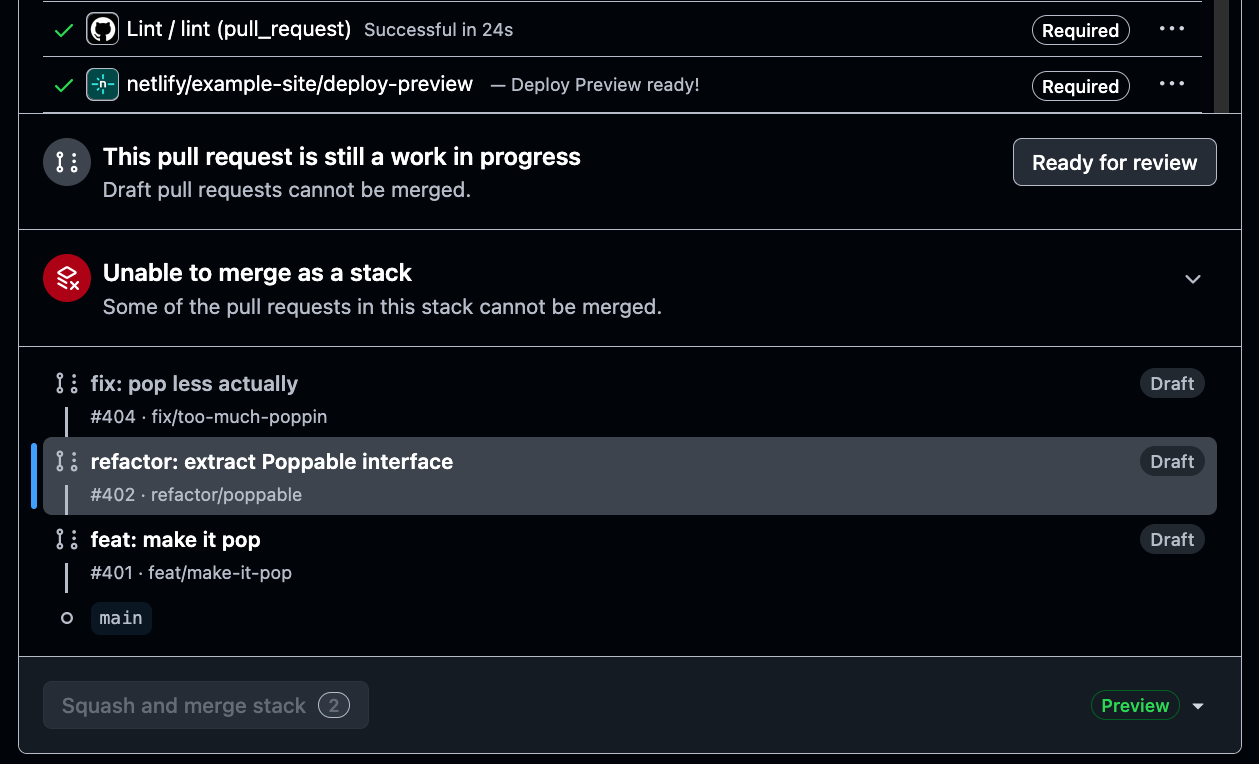
GitHub Stacked Pull Requests help teams split a larger update into smaller, connected pull requests. Each pull request can focus on one step of the work, making changes easier to review and merge in sequence.
Previously, Netlify only created a Deploy Preview for the first pull request in your stack while additional pull requests in the stack didn’t get their own Deploy Previews. Now, every pull request in the stack gets its own Deploy Preview.
There’s nothing new to configure. Create and update your stack in GitHub as usual, and Netlify automatically adds a Deploy Preview to each eligible pull request.
Learn More
-
The Next.js team has disclosed two critical severity vulnerabilities, both of which can lead to unauthenticated remote code execution. Both are patched in 15.5.24 and 16.3.3. Netlify-hosted sites are not affected by the Windows issue, and do not run the Next.js code path affected by the image issue. We still recommend upgrading. Here’s what Netlify customers need to know.
Vulnerabilities
Vulnerability Severity Affected versions CVE-2026-75604 / GHSA-p293-qw3h-jr36 — Unauthenticated remote code execution on Windows-hosted servers Critical ≥13.4.0 <15.5.24, ≥16.0.0 <16.3.3 GHSA-2xp9-vwfh-vxw4 — Unauthenticated remote code execution in Image Optimization API when AVIF files are used Critical ≥10.0.0 <15.5.24, ≥16.0.0 <16.3.3 Impact on Netlify
Unauthenticated remote code execution on Windows-hosted servers
CVE-2026-75604 / GHSA-p293-qw3h-jr36: Netlify sites are not affected. The issue affects Windows-hosted deployments only, and Netlify Functions and Edge Functions run on Linux.
Unauthenticated remote code execution in Image Optimization API when AVIF files are used
GHSA-2xp9-vwfh-vxw4: Netlify sites do not run the affected Next.js code path. Requests to
/_next/imageare rewritten to Netlify Image CDN at our edge, so the Next.js Image Optimization API is never invoked.What should I do?
Netlify sites are not affected by the Windows issue and do not run the affected image code path, but we always strongly recommend upgrading as soon as possible to patched releases:
next15.5.24 or later, or 16.3.3 or later, then redeploy.
Resources
-
Private projects on Netlify will now show a pre-launch toolbar so you can share your project for review and run audits using AI checks before you make your project public.
Private projects and agent runs require a Credit pricing plan. If you’re on a Legacy pricing plan, you will not have access to the pre-launch toolbar. Audits consume credits like any other agent run.
For public projects, new projects created on a Free plan on or after August 19, 2026 show a Powered by Netlify badge to all visitors.
The badge is configurable for each project through your project configuration settings.
To turn the Netlify badge on or off for all visitors of your site:
- Go to Project configuration > General > Powered by Netlify badge and turn it on or off.
Additionally, any visitor can hide the badge for themselves, and that choice is stored locally on their browser and never reaches Netlify.
All projects created before August 19, 2026 have the badge off by default.
Users on a Credit-based Personal and Pro plans can also turn the badge on or off per-project. For these plans, the badge is always off by default.
Release timeline
We’re rolling both overlays out gradually over the next few weeks, so a project that qualifies may not have them yet.
Learn more about the pre-launch toolbar and the Powered by Netlify badge in the Netlify documentation.
-
Agent Runners can now ask you clarifying questions before they start building. When a few details could significantly improve the result, the agent pauses and asks instead of guessing.
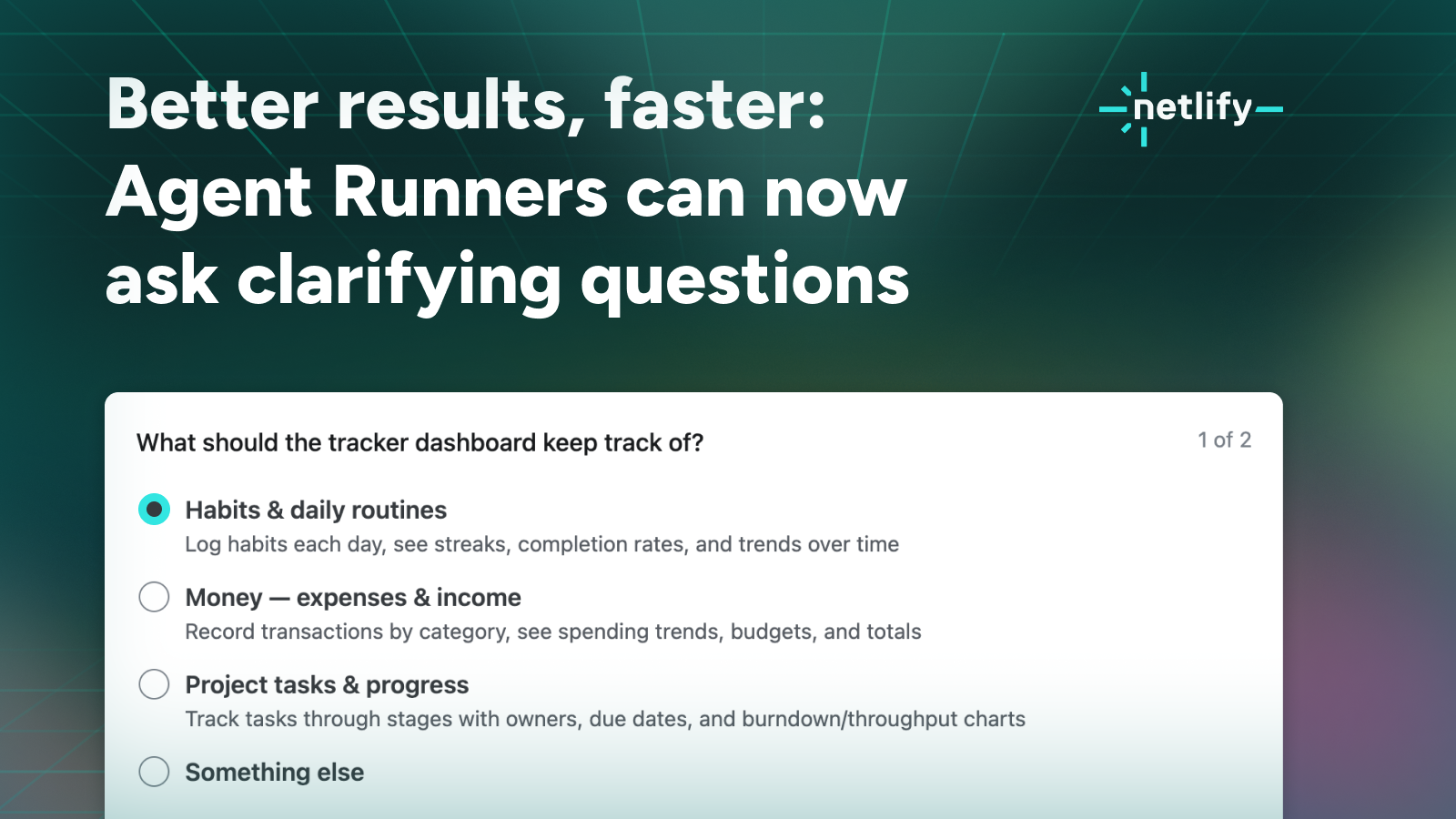
How clarifying questions work
Say you start with something broad, like “Build a tracker dashboard.” Previously the agent had to make every call for you: what the dashboard should track, whether entries should be editable and saved to a database or live in the code as a read-only placeholder, whether the look should be dark and high-contrast or light, clean, and editorial. Now it can ask, and you can answer directly where the agent run works.
Answer, skip, or add your own context
Answering questions is always optional so you can answer the ones you have opinions about and skip the rest. Or you can skip all questions and let the agent decide. Finally, you can always add context in your own words alongside your answers.
In our testing, even a few quick answers make the first build noticeably sharper and saves credits you’d otherwise spend on course corrections.
Once you answer, the run continues as usual: the agent writes the code, works with Netlify’s platform features, and creates a Deploy Preview you can review and iterate on.
Learn more
Clarifying questions work with every agent and model available in Agent Runners.
Try it out and see how to use Agent Runners in our docs.
-
Google’s Gemini 3.7 Flash model is now available through Netlify’s AI Gateway and Agent Runners with zero configuration required.
Use the Google GenAI SDK directly in your Netlify Functions without managing API keys or authentication. The AI Gateway handles everything automatically. Here’s an example using the Gemini 3.7 Flash model:
import { GoogleGenAI } from '@google/genai';export default async () => {const ai = new GoogleGenAI({});const response = await ai.models.generateContent({model: 'gemini-3.7-flash',contents: 'How can AI improve my coding?'});return Response.json(response);};Gemini 3.7 Flash is available for all Function types and Agent Runners. You get automatic access to Netlify’s caching, rate limiting, and authentication infrastructure.
Learn more in the AI Gateway documentation and Agent Runners documentation.
-
Invitations to join an existing team now show up within your Netlify dashboard, where you can accept or decline them directly without checking your email inbox.
Previously, the invitation email was the only way in. If it got buried, filtered, or sent to an address you no longer check, then getting collaboration started with your teammate took a lot longer than it needed to.
Now, when you sign in to Netlify with an email address that has a pending invitation, you’ll see it waiting for you. Accept it and you’re on the team immediately. Decline it and it’s cleared out. Either way, you never have to go digging through your inbox.
Nothing changes about how invitations are sent. Invitees still receive the same email they always have, and accepting from that link works exactly as before. This is simply a second, more reliable path to the same place.
Learn more about inviting and managing teammates in Manage team members in the Netlify documentation.
-
You can now pay for Netlify with Apple Pay or Google Pay, in addition to paying by credit card.
Both options show up as you’d expect at checkout, so you can confirm a payment with the device you already have in hand instead of tracking down a card. It’s a small change, but it removes a genuine bit of friction—especially when you’re upgrading in the middle of shipping something and don’t want to break flow to go find your wallet.
Credit cards continue to work exactly as they always have. If that’s what your team uses, there’s nothing to change and nothing to migrate. Apple Pay and Google Pay are simply two more ways to pay.
Learn more in the Netlify billing documentation.
-
If your team uses SSO (single sign-on) with an identity provider, you can now sign in with just your email address without using your team ID. Netlify recognizes your domain and sends you straight to your identity provider.
Previously, SSO required you to know your Team ID. That meant every new hire had to know and enter a Team ID, and anyone who forgot or didn’t know it was stuck at the login screen. It was a small detail that quietly created support work for the people administering the team.
Now the flow is simplified: enter your email, get redirected to whichever identity provider your team has configured, authenticate there, and land back in Netlify.
This is live for every team using SSO with an identity provider that lets you use your email address to authenticate. This means your existing SAML setup already carries everything Netlify needs to route people to the right place.
Learn more about configuring SAML SSO in the Netlify documentation.